NourishNetBook a demo

For skilled nursing facilities on PointClickCare

Catch weight loss early. Prove it was handled.

NourishNet watches every weight in PointClickCare, puts each significant change in front of your dietitian, and closes the loop only when the chart shows it was dealt with.

  • Read-only to PointClickCare
  • F692 thresholds built in
  • Built for HIPAA
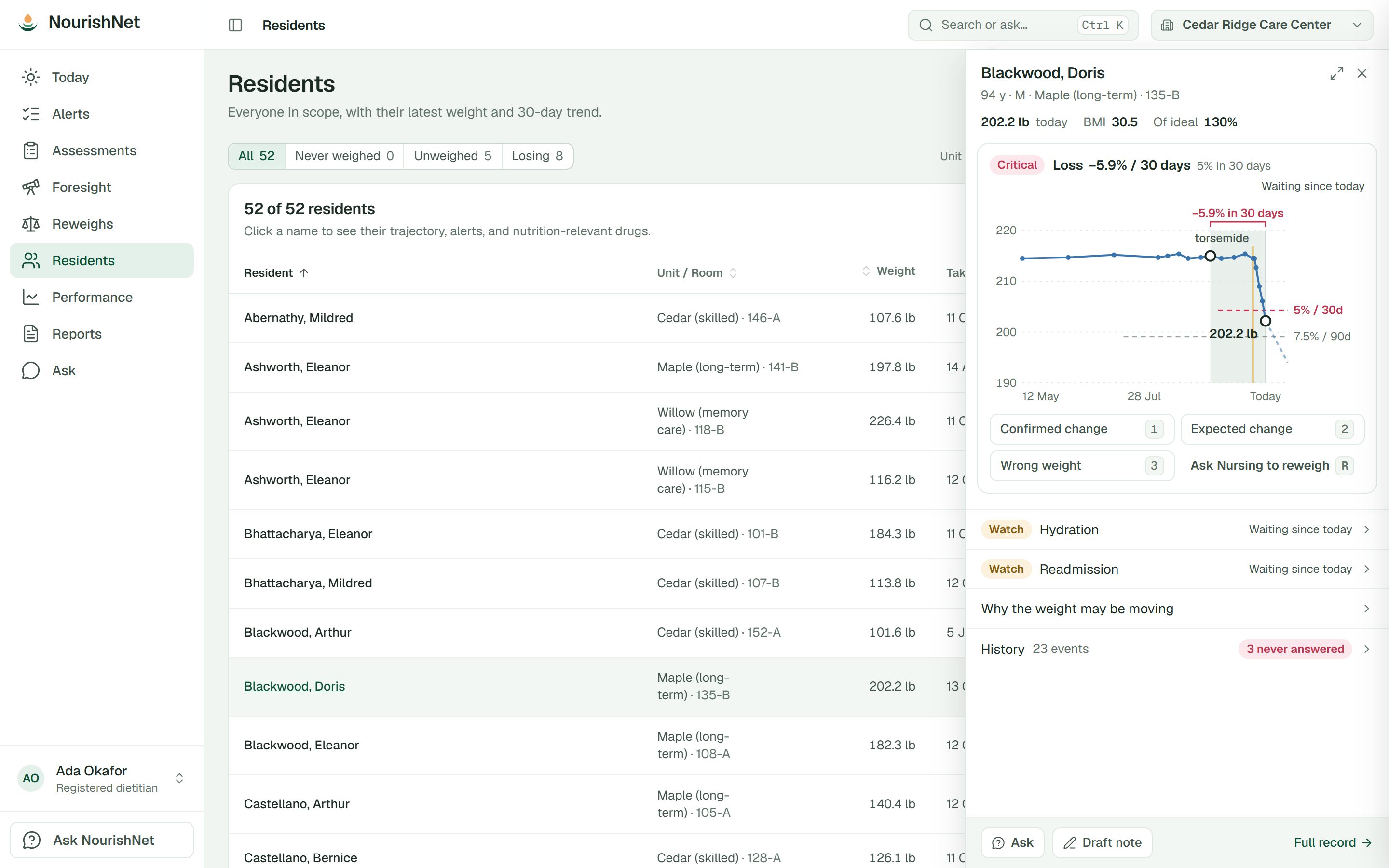
A resident's weight chart showing a 5.9% loss in 30 days against the significant-loss lines, marked critical, with the dietitian's choices beneath it: confirmed change, expected change, wrong weight, or ask Nursing to reweigh.

Synthetic data. No real residents appear on this site.

The problem

The weights are in the chart. The follow-through isn't.

Significant unplanned weight loss is one of the most visible things a surveyor checks under F692. Most facilities already have the data. What they lack is someone, or something, watching it every day.

Weights get recorded, then wait

A 5% loss charted on Tuesday can sit unseen until the dietitian's next visit. Between visits, nobody is watching the scale.

A note is not a closed loop

The dietitian writes a recommendation. Whether the care plan or the order actually changed is something you find out in survey.

Leaders can't see across buildings

DONs, regional dietitians and corporate have no shared view of which units are slipping, or which dietitian is behind.

How it works

A closed loop, not a checkbox.

Nobody is asked to attest that something was done. NourishNet keeps watching PointClickCare until the chart shows it.

  1. 01

    Read

    Sync reads census, weights, progress notes, care plans, orders, labs, vitals and MDS items from PointClickCare. It never writes back.

  2. 02

    Flag

    Versioned rules apply the F692 thresholds, admission weights and weighing cadence. A reading that looks implausible goes to Nursing as a reweigh request first.

  3. 03

    Decide

    Every alert ends with the dietitian's verdict: confirmed change, expected change, or wrong weight. Only the dietitian can make that call.

  4. 04

    Verify

    A confirmed change stays open until sync sees the progress note, care-plan revision or order change in PointClickCare. Then it closes itself.

Significant unplanned loss under 42 CFR 483.25(g). Stamped with the rule version on every result, so you can always show which rule fired.

  • 5%in 30 days
  • 7.5%in 90 days
  • 10%in 180 days

For your team

One record. A view for everyone who answers for it.

Everyone signs in to the same data and sees it from where they stand: the dietitian's next decision, the DON's floor, the region's weakest building.

Dietitian

Walk in knowing what changed since your last visit.

  • A visit brief of what moved while you were away: reweighs, new alerts, and residents losing again after your last call
  • Alerts ranked by urgency, with a reweigh request one click away
  • A trend projection that shows who is heading for a threshold
  • Supplement and tube-feed reviews due at 30, 60 and 90 days
  • Tube feed, wound, dialysis and weight-change notes drafted for you to edit
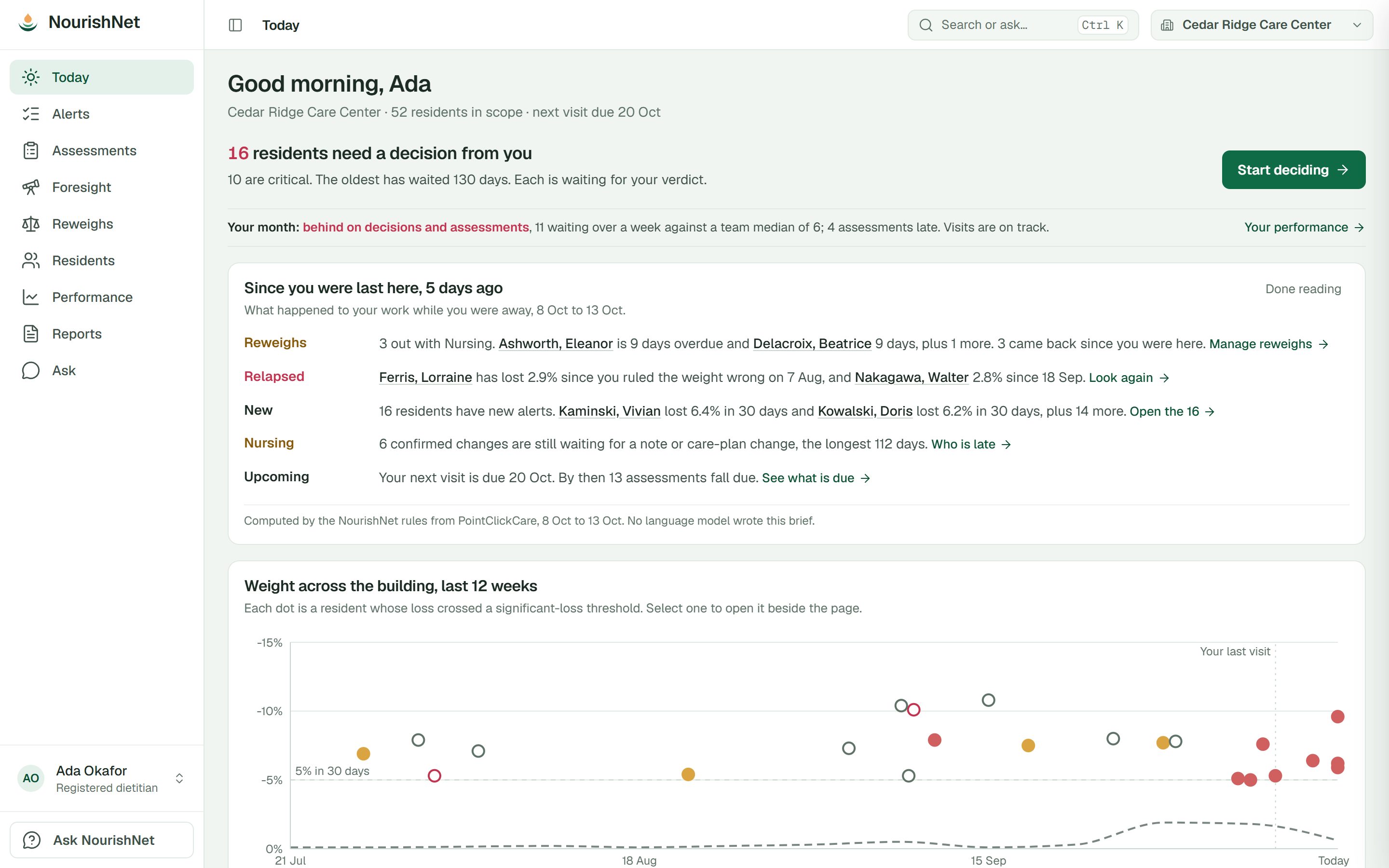
The dietitian's Today page: residents waiting on a decision, a brief of what changed since the last visit, and every significant loss in the building over the last 12 weeks.

DON and ADON

Your floor, unit by unit, today.

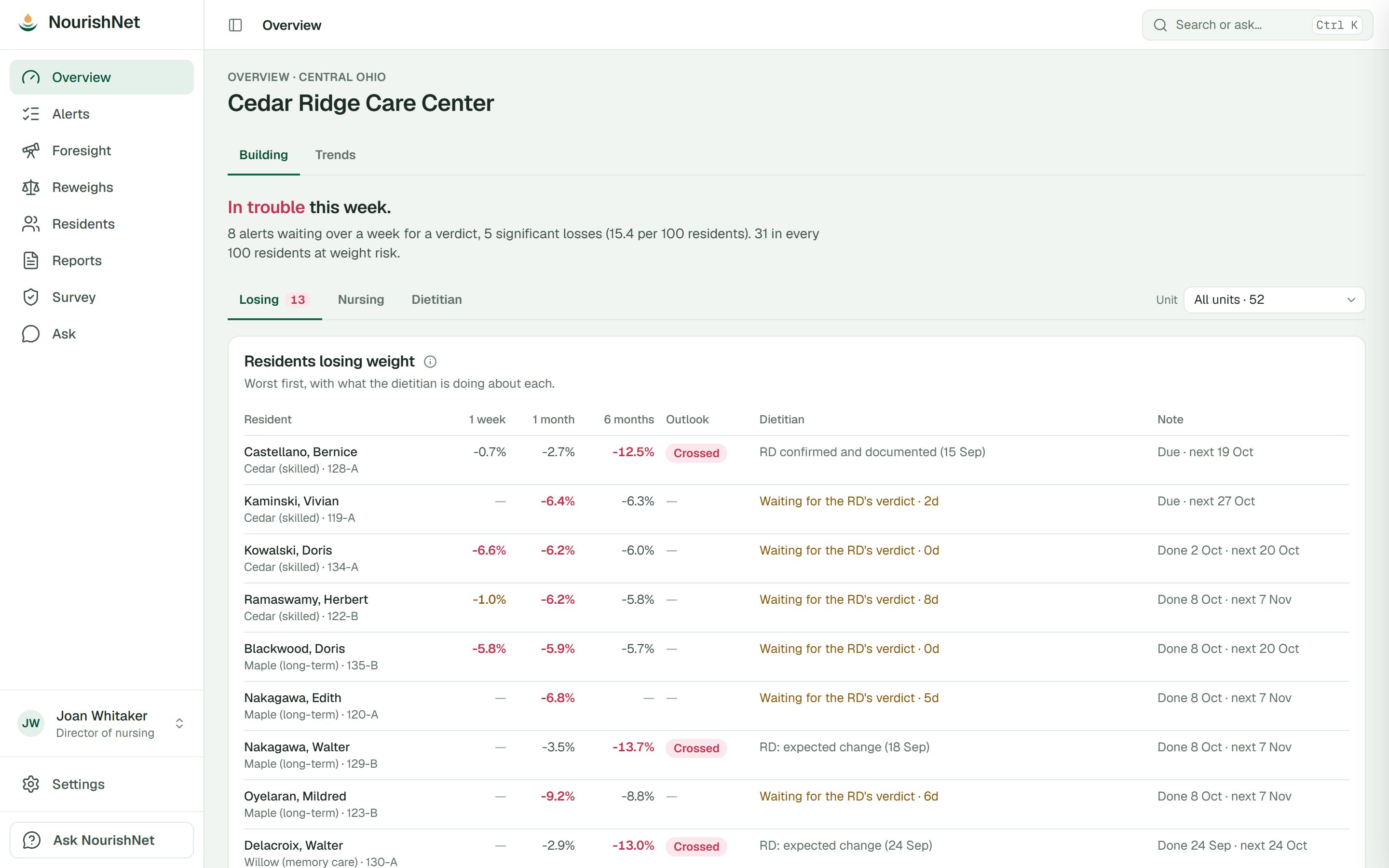
  • Residents losing weight, worst first, at one week, one month and six months
  • What the dietitian is doing about each one, and when the next note is due
  • Who is due on the scale, and who has no height on file, by unit
  • Reweigh requests, and whether Nursing answered them
The building overview: residents losing weight, worst first, at one week, one month and six months, with what the dietitian is doing about each and when the next note is due.

Regional dietitian

Know which building needs a call.

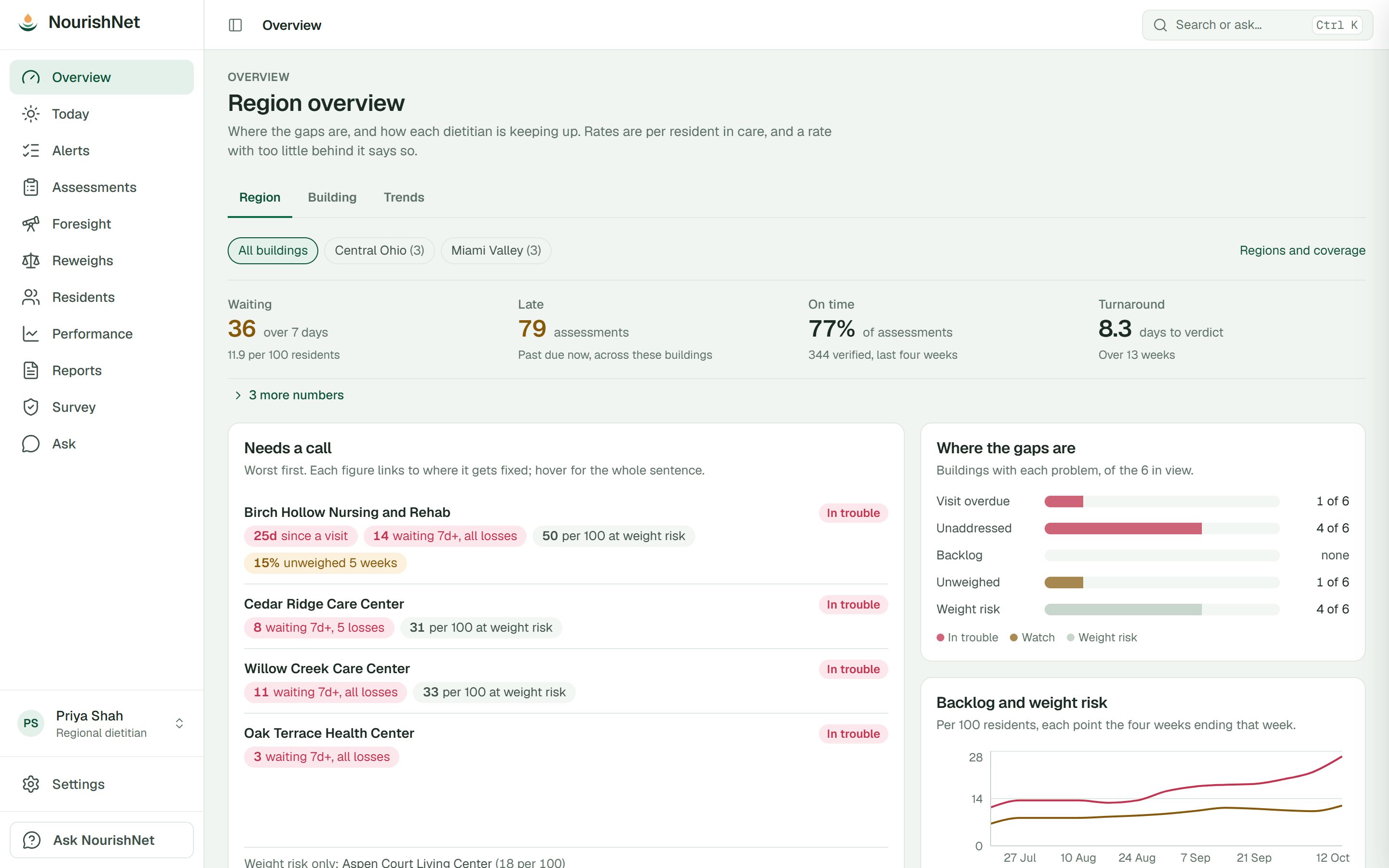
  • Buildings ranked worst first, with the reason on each
  • Each dietitian by name: alerts waiting, late notes, days to verdict
  • Monthly notes by type: tube feed, wound, dialysis, weight
  • Rates per 100 residents, flagged when there is too little behind them
The region overview: buildings that need a call, worst first, and where the gaps are across six buildings.

Corporate

Every building on one map.

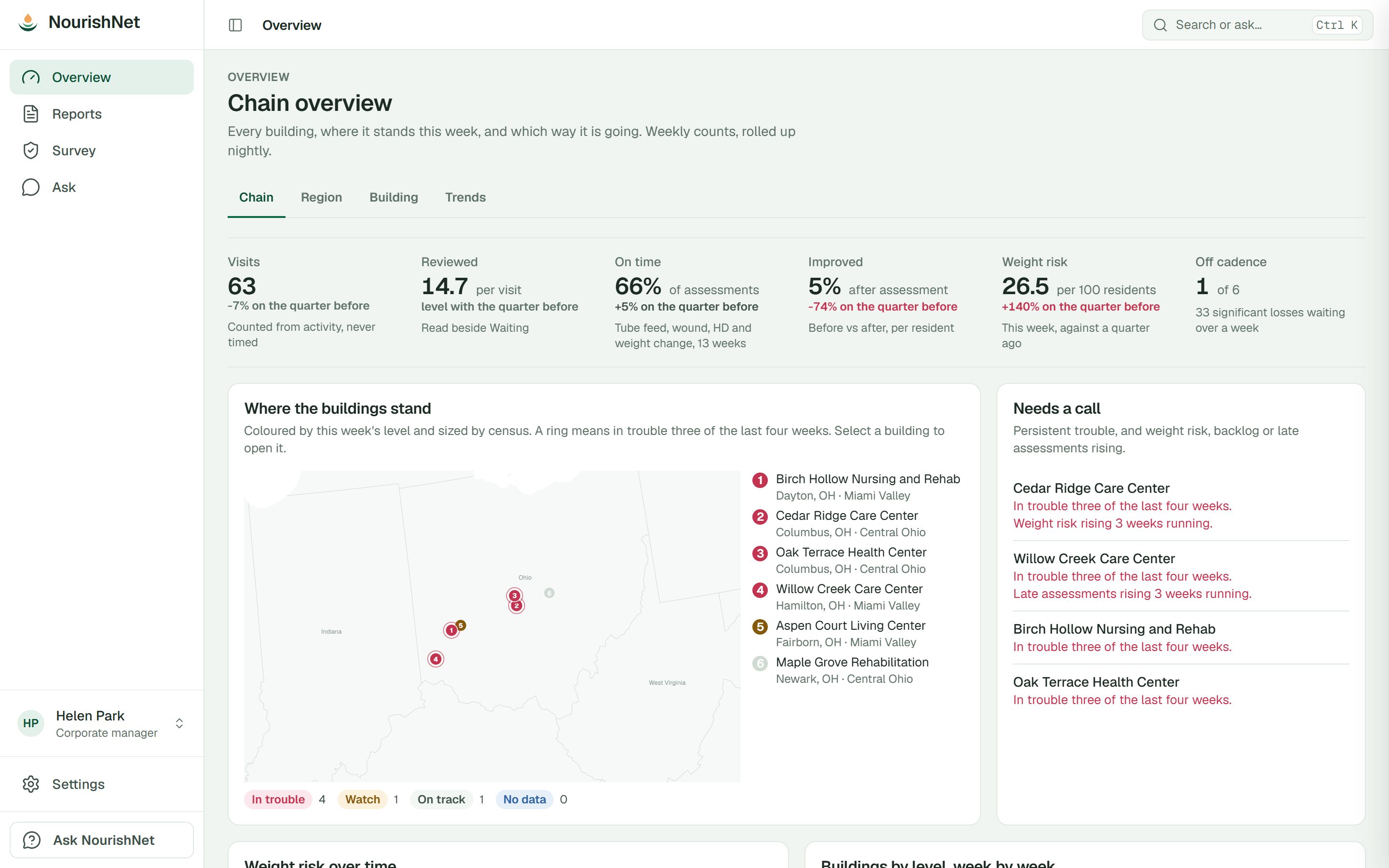
  • Buildings coloured by this week's status and sized by census
  • Thirteen weeks of trend for every building
  • Buildings in trouble three of the last four weeks, called out
  • Weekly counts you can trace, not a black-box score
The chain overview: dietitian visits, assessments on time, and a map of every building coloured by this week's status.

Survey readiness

Survey-ready on an ordinary Tuesday.

Twelve reports, each anchored to 42 CFR 483.25(g) and F692. They run on demand from the current record, so there is nothing to assemble the night before.

A plan of correction that closes itself

The systems audit turns gaps into items with an owner and a date. When the record shows a gap is gone, the item closes without anyone ticking a box.

Survey and compliance

  • Significant weight change by unit (F692)
  • Survey packet, with rule definitions and version
  • Survey sample
  • Supplement register
  • Nutrition systems audit

Weighing on the floor

  • Weighing cadence adherence
  • Residents with no current weight
  • Residents without a height

Clinical risk

  • Malnutrition capture
  • Hydration risk
  • Readmission risk

The dietitian's work

  • Assessments and what followed

Every report exports to CSV, and every view and export is recorded in the audit log.

Beyond the scale

The rest of the nutrition picture, from the same record.

Every rule is plain arithmetic you can read, tested, and stamped with its version. Nothing is a black box.

Supplement lifecycle

Reviews due at 30, 60 and 90 days, then quarterly. Residents still losing weight on a supplement are flagged for the unit manager.

Hydration risk

Read from the record: diuretics, cognition, tube feeds, age, recent dehydration or UTI, and lab signals such as a high BUN-to-creatinine ratio.

Malnutrition capture

Residents whose loss meets the AND/ASPEN weight-loss characteristic but have no malnutrition diagnosis coded, with an estimate of the PDPM impact.

Scale data quality

Catches rounding bias and weights copied forward from the last entry, so bad data is fixed before it turns into an alert.

Attention Score

A triage score built from 20 signals, with every point explained. Your organisation sets it, and each building can adjust it.

Readmission triage

Ranks residents by nutrition-related readmission factors so the plan reaches the right people first. It ranks; it does not predict.

AI, carefully

It drafts. It never decides, and it never sees a name.

  • Common questions, such as who needs a reweigh or who is losing weight, are answered by the rules engine, not by a model.
  • Anything else is reasoned over facts NourishNet has already computed, with names, birth dates, rooms and PointClickCare IDs removed first.
  • Every number in a reply is checked against those facts. The model never calculates a clinical figure.
  • Notes are drafts. The dietitian edits every one and charts it in PointClickCare.

Inside NourishNet

Resident
Blackwood, D.
Room
Maple 135-B
Loss
5.9% in 30 days
Started
diuretic, 22 Sep

Sent to the model

resident
R-07
room
removed
loss_30d
5.9%
change
diuretic started

A leak guard checks the exact payload before it leaves. Names are put back only inside NourishNet, on your screen.

Security

Built for HIPAA from day one.

PointClickCare stays the system of record. NourishNet keeps the work around it: alerts, verdicts and review dates. Privacy was a design rule from the start, not a feature added later.

Read-only to PointClickCare

No writes, ever. PointClickCare stays your system of record, and NourishNet never changes a chart.

Every access recorded

Every read and export of resident data is logged with its purpose, in an audit log that can't be edited.

Scoped to the building

Every record belongs to a facility, and people see only the buildings they are assigned to.

No PHI in email

Notifications carry counts and a link back into the app. Never a name.

AI without PHI

The model receives de-identified, already-computed facts, and nothing else.

Encrypted

TLS in transit. PointClickCare credentials and sessions are sealed with AES-256-GCM.

FAQ

Questions buyers ask.

Does our staff have to change how they chart?

No. Weights, notes, care plans and orders stay in PointClickCare, entered the way they are today. NourishNet reads them and tells each person what needs their attention.

Does NourishNet write anything into PointClickCare?

Never. It is read-only by design. When NourishNet drafts a note, the dietitian edits it and charts it in PointClickCare themselves.

What does it read?

Census, weights and heights, progress notes, care plans, orders, diagnoses, labs, vital signs, and MDS items including BIMS and GG eating.

Is there anything it can't see?

Meal intake, the MAR and diet orders aren't available through PointClickCare's interface today, so NourishNet doesn't depend on them. Where a rule would need them, it says so instead of guessing.

Who signs in?

Dietitians, DONs and ADONs, administrators, dietary managers, MDS coordinators, regional dietitians and corporate. Each sees the buildings they are assigned to, in the view that fits their job.

Does the AI make clinical decisions?

No. Every alert ends with a dietitian's verdict, and every number comes from the rules engine. The AI drafts prose and answers questions over de-identified facts.

Is the Attention Score a validated clinical instrument?

No, and we don't present it as one. It is a transparent triage aid: every point is explained, your organisation sets the weights, and each change is versioned.

How do we get started?

Book a demo. We'll walk through NourishNet on synthetic data, with the dietitian's day, the DON's floor view and the regional roll-up, and talk through connecting your buildings.

See it on a building like yours.

A 30-minute walkthrough on synthetic data: the dietitian's day, the DON's floor view and the regional roll-up.